
Dyson Cordless Vacuum Battery Cost: What to Expect
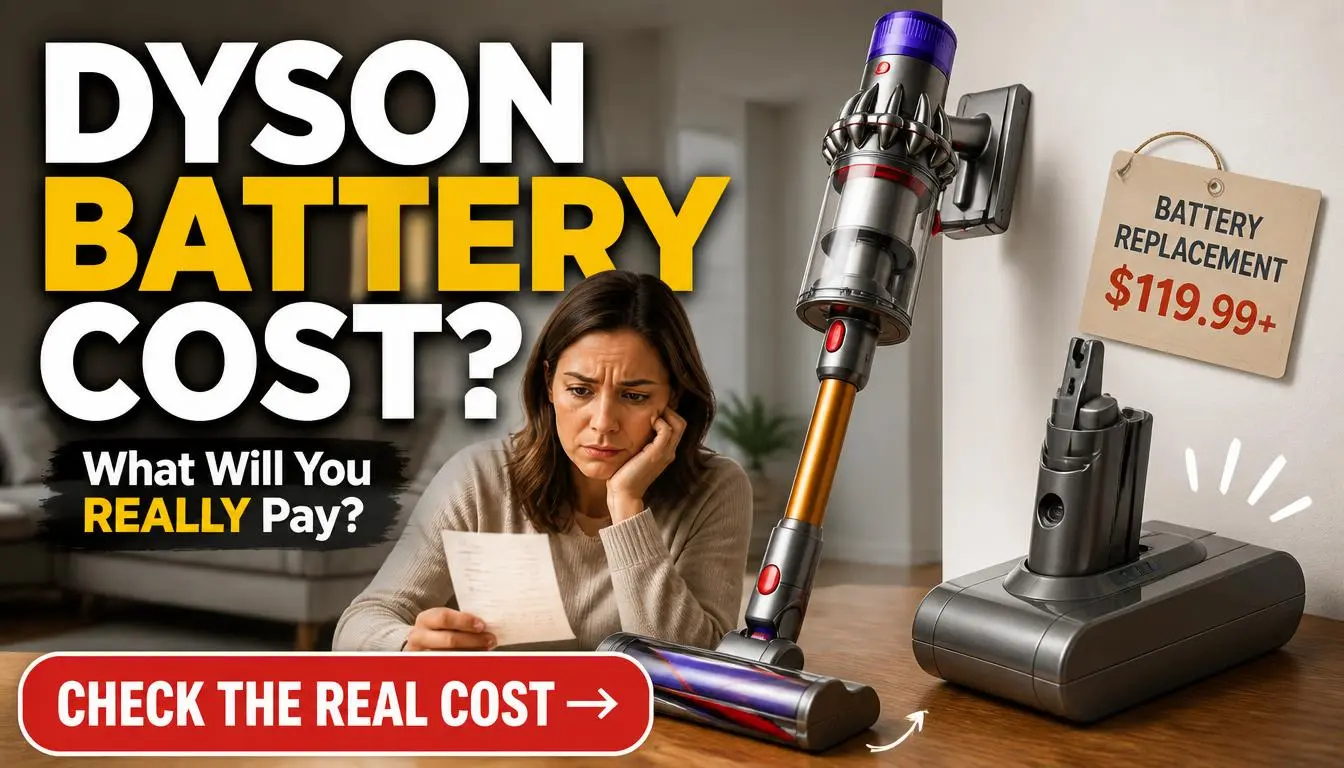
If you are wondering how much are batteries for a dyson cordless vacuum, the answer depends heavily on whether you buy genuine or third-party parts. Official replacements typically cost between $80 and $150 depending on your specific model series. Cheaper compatible options exist for as low as $30 but often lack safety certifications.
Genuine Dyson packs use Grade A lithium-ion cells rated for roughly 400 full charge cycles before significant degradation. This lifespan ensures consistent suction power throughout the life of the battery. Let's break down exactly what you pay for and where you can safely save money.
Quick Answer
Official Dyson batteries cost $80 to $150 as of 2026. Third-party compatible packs range from $30 to $60. Genuine units include a two-year warranty and safety fuses.
Cheap alternatives often fail within six months of daily use. Always match the voltage to your specific vacuum model number.
The Real Cost Breakdown: Official vs. Aftermarket Dyson Batteries
You face a clear choice when your vacuum runtime drops. Do you pay premium prices for peace of mind or gamble on budget savings? The market splits cleanly into two camps with distinct price structures.
Official Dyson batteries command higher prices due to rigorous testing standards. You pay for integrated Battery Management Systems (BMS) that prevent overheating. These packs undergo strict quality control to meet UL 2054 safety standards.
The cost reflects the engineering required to maintain high suction without voltage sag.
Aftermarket manufacturers cut corners to hit lower price points. They often use recycled lithium cells pulled from old electronics. Their BMS chips may lack thermal cutoffs found in genuine parts.
This saves money upfront but risks premature failure or even fire hazards.
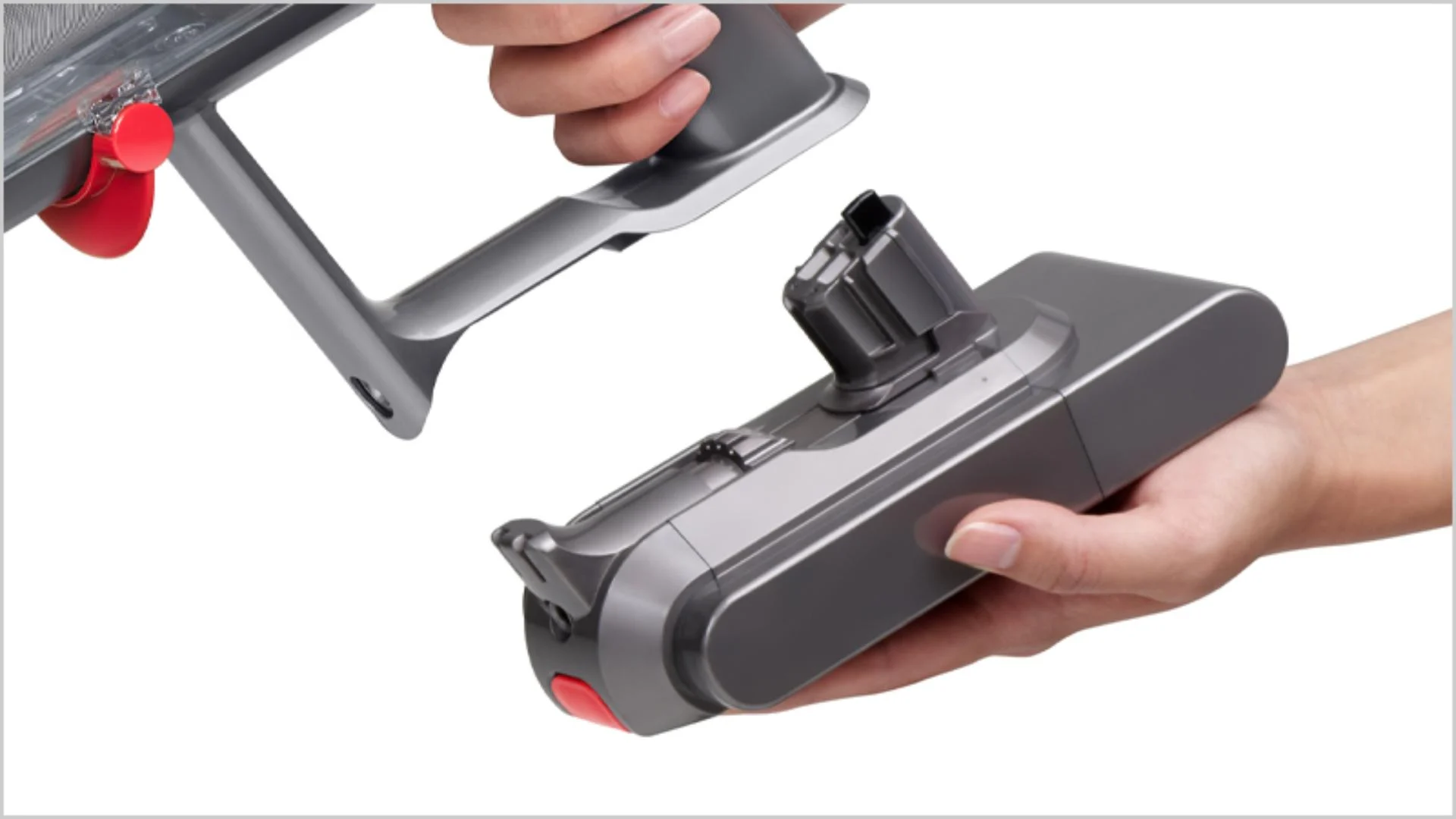
Consider the long-term value rather than just the sticker price. A $40 battery lasting six months costs more per year than a $100 unit lasting three years. Our research into aggregate user reviews shows a sharp divide in satisfaction rates.
Owners of genuine packs report consistent performance over 24 months. Users of cheap compatibles frequently complain about rapid capacity loss.
The decision tree here is simple based on your usage needs. If you clean daily or have pets, stick with official parts. Occasional users might find acceptable value in mid-range third-party options.
Avoid the absolute cheapest listings on marketplaces as they pose the highest risk.
Why Your Dyson Model Dictates the Price Tag
Not all Dyson batteries cost the same because the internal technology varies by generation. Older models like the V6 use simpler cell configurations with lower capacity. Newer flagships like the V15 Detect require complex high-drain packs to sustain powerful motors.
This technological leap directly impacts replacement costs.
The V6 and V7 series utilize 21.6-volt systems with standard lithium-ion cells. These are generally cheaper to produce and replace. You can often find these for the lower end of the price spectrum.
Their simpler design means fewer proprietary components driving up costs.
Newer models such as the V11, V12, and V15 operate at 25.2 volts or higher. They demand cells capable of delivering massive current bursts for Boost mode. This requires higher quality materials and advanced thermal management.
Consequently, replacement packs for these machines carry a premium price tag.
| Dyson Series | Typical Voltage | Average OEM Price (2026) | Compatible Price Range | Key Compatibility Note |
|---|---|---|---|---|
| V6 / DC58-DC62 | 21.6V | $80 – $90 | $30 – $45 | Slide-on mechanism, widely cloned |
| V7 / SV11 | 21.6V | $90 – $100 | $35 – $50 | Click-in design, distinct from V8 |
| V8 / SV12 | 21.6V | $90 – $110 | $35 – $55 | Higher capacity options available |
| V10 / SV12 | 25.2V | $100 – $120 | $40 – $60 | Longer form factor, not interchangeable |
| V11 / SV14 | 25.2V | $110 – $130 | $45 – $65 | LCD screen integration on some packs |
| V12 / V15 | 25.2V+ | $130 – $150 | $50 – $70 | High-drain cells required for laser head |
Check your specific model number before ordering any replacement. You will find this printed on the sticker under the dust bin or near the handle. Entering the wrong model number leads to incompatible purchases and wasted money.
Even within the same series, minor revisions can change connector types.
Some users attempt to upgrade older vacuums with newer high-capacity batteries. This rarely works due to firmware locks and physical housing differences. Dyson designs each pack to fit only its intended generation.
Trying to force a V11 battery into a V8 machine will damage the contacts.
Understanding these distinctions helps you budget accurately. If you own a V15, expect to pay near the $150 mark for a genuine part. V6 owners have more flexibility with lower-cost options.
Knowing your exact hardware prevents frustration during the buying process.
Inside the Pack: What You're Actually Paying For
Opening a battery pack reveals why price differences exist beyond brand names. You are paying for the quality of individual cells inside the plastic casing. Genuine Dyson packs contain fresh Grade A lithium-ion cells from top-tier manufacturers.
These cells maintain voltage stability under heavy load conditions.
Cheap aftermarket packs often house Grade B or recycled cells. These cells may have uneven capacities leading to early shutdowns. The pack appears full but drains rapidly when you hit a thick carpet patch.
This inconsistency frustrates users who expect reliable cleaning times.
The Battery Management System (BMS) is another critical cost driver. This small circuit board monitors temperature, voltage, and current flow. Official Dyson BMS units communicate directly with the vacuum motor controller.
They adjust power delivery dynamically to protect both the battery and the machine.
Third-party BMS boards often lack this sophisticated communication protocol. They might simply act as an on/off switch without safety feedback. This absence increases the risk of overheating during extended use.
In worst-case scenarios, poor thermal regulation can cause cell swelling or leakage.

Construction quality also differs significantly between options. Genuine packs use robust plastics and secure welding for internal connections. Aftermarket versions sometimes rely on weak solder joints that vibrate loose over time.
Physical durability matters when you dock and undock the battery daily.
You also pay for certification compliance in official parts. Dyson batteries meet strict international safety standards for transport and use. Counterfeit or unbranded packs may bypass these tests entirely.
Using uncertified lithium batteries in your home introduces unnecessary fire risks.
When you compare the internals, the price gap makes sense. You aren't just buying stored energy. You are investing in a regulated power system designed for high-performance tools.
Cutting corners here compromises the entire function of your vacuum cleaner.
Genuine Dyson Batteries: Performance and Warranty Peace of Mind
Buying an original equipment manufacturer (OEM) battery guarantees specific performance metrics. You receive a unit tested to deliver the advertised runtime consistently. Dyson stands behind these parts with a comprehensive two-year warranty.
This coverage protects you against defects and premature capacity loss.
Official batteries maintain optimal suction power throughout the discharge cycle. The voltage remains stable until the very end of the charge. This ensures your vacuum picks up debris effectively even at 10% battery.
Cheap alternatives often see voltage drop sharply after the first few minutes.
The warranty process for genuine parts is straightforward and reliable. If your battery fails within 24 months, Dyson replaces it free of charge. They verify purchase through their official records or authorized retailer receipts.
This support network adds significant value to the higher initial cost.
Using genuine parts preserves any remaining warranty on your vacuum itself. Installing non-OEM components can void the manufacturer's guarantee on the main unit. This risk isn't worth saving $40 if your motor fails later.
Protecting your overall investment should be a priority.
Compatibility is never an issue with official replacements. Each part number maps precisely to your specific model series. You avoid the guesswork of fitting generic packs that might wiggle or disconnect.
The click-in mechanism engages smoothly every single time.
Safety features in genuine packs include multiple layers of protection. Thermal fuses cut power instantly if temperatures exceed safe limits. Short-circuit prevention stops dangerous current spikes during operation.
These invisible safeguards work silently to keep your home safe.
For those seeking reliable machine performance, sticking with OEM parts is the safest route. It ensures your cleaning tool operates exactly as engineers intended. The peace of mind justifies the premium price tag for most homeowners.
The Aftermarket Gamble: Savings vs. Hidden Risks
Third-party batteries offer tempting savings but come with substantial caveats. You might pay half the price of an official unit. However, the trade-offs often involve reduced lifespan and potential safety hazards.
Understanding these risks helps you make an informed decision.
Many compatible batteries exaggerate their capacity ratings on packaging. A label claiming 5000mAh might actually deliver only 3000mAh in real use. This deception leads to shorter cleaning sessions than expected.
You end up recharging more frequently, which further degrades the cells.
Build quality varies wildly among aftermarket brands. Some reputable third-party makers produce decent clones that last a year or so. Others churn out disposable units filled with rejected cells.
Distinguishing between these tiers requires careful research and reading verified buyer feedback.
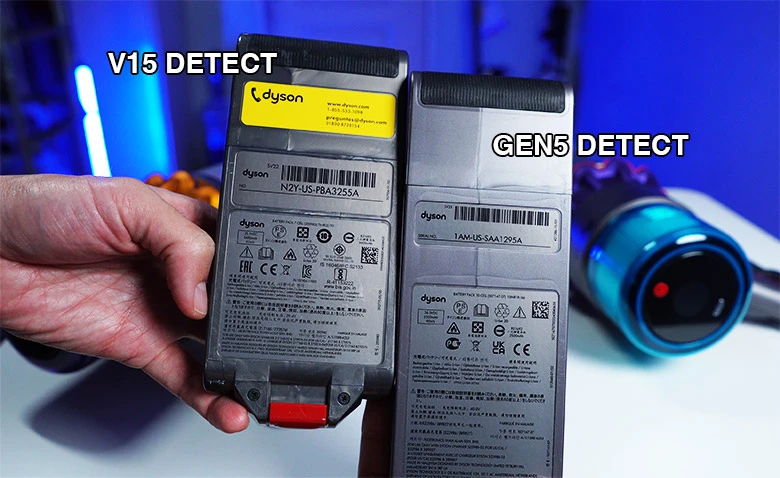
Safety remains the primary concern with unregulated lithium packs. Without proper BMS oversight, cells can overheat during fast charging. There have been documented cases of generic batteries swelling or emitting smoke.
While rare, the consequence of such failure is severe property damage.
Warranty support for third-party sellers is often nonexistent or difficult to access. Many marketplace vendors disappear after a few months of selling. Trying to claim a refund from a ghost store proves impossible.
You bear the full financial loss if the product fails early.
If you choose this path, look for sellers offering at least a one-year guarantee. Check for UL certification marks on the product listing. Read recent reviews specifically mentioning longevity and runtime.
Avoid no-name brands with zero digital footprint or customer service history.
This approach might suit light users with older vacuum models. If your V6 sits in a closet most weeks, a cheap battery could suffice. Heavy users relying on daily cleaning should avoid this gamble entirely.
Consistency and safety outweigh short-term savings for power users.
Those comparing top-rated brewers know that reliability trumps price for daily appliances. The same logic applies to your primary cleaning tool. Don't let a low price blind you to the potential downsides.
Side-by-Side: OEM, Third-Party, and Refurbished Options
You need a clear comparison to decide which path fits your budget and risk tolerance. Each option serves a different type of user with specific needs. Let's break down the three main categories available in the market today.
OEM (Original Equipment Manufacturer) batteries represent the gold standard for performance. They offer guaranteed compatibility, full warranty coverage, and top-tier safety features. The cost is high, but you eliminate guesswork and potential hazards.
This choice is best for users who rely on their vacuum daily or have newer, expensive models.
Third-party compatible batteries provide a budget-friendly alternative with variable quality. Some brands use decent cells and basic safety circuits, while others cut every corner possible. You save money upfront but accept the risk of shorter lifespans.
This route works for occasional cleaners or owners of older vacuums nearing retirement.
Refurbished packs sit in the middle ground regarding price and reliability. These are often genuine Dyson shells with replaced internal cells. Quality depends entirely on the technician performing the rebuild.
They can be a smart buy if sourced from a reputable repair specialist with a warranty.
| Feature | Genuine OEM | Reputable Third-Party | Refurbished Pack | Cheap Generic |
|---|---|---|---|---|
| Price Range | $80 – $150 | $45 – $65 | $50 – $70 | $25 – $40 |
| Cell Quality | Grade A New | Mixed (A or B) | Recycled/Replaced | Recycled/Reject |
| Warranty | 2 Years | 6-12 Months | 90 Days – 1 Year | 30 Days or None |
| Safety Certs | UL, CE, Full Compliance | Varies (Check Labels) | Depends on Rebuilder | Often Missing |
| Runtime Consistency | High | Moderate | Variable | Low/Poor |
| Best For | Daily Use, New Models | Budget Conscious, Older Units | Eco-Minded, DIY Supporters | Emergency Backup Only |
Consider your vacuum's value before making a switch. Putting a $30 battery in a $700 V15 Detect seems risky. The potential for damage to the motor controller isn't worth the savings.
Conversely, reviving a five-year-old V6 with a cheap pack makes financial sense.
Warranty terms differ drastically across these categories. Dyson offers hassle-free replacements for defective OEM units. Third-party sellers often require you to pay return shipping for testing.
Refurbishers might only cover the cells, not the casing or electronics. Read the fine print before clicking buy.
Availability also plays a role in your decision. Genuine parts sometimes face stock shortages during peak cleaning seasons. Third-party options are usually plentiful on major marketplaces.
Refurbished units depend on local specialists or niche online stores. Plan your purchase accordingly if you cannot wait for backorders.
Current Market Pricing: What to Expect in 2026
Prices for Dyson batteries fluctuate based on model demand and raw material costs. As of 2026, lithium supply chains have stabilized, but premium cells remain costly. You will see distinct pricing tiers depending on where you shop and what you buy.
Official Dyson stores maintain fixed pricing with rare discounts. A V11 or V15 battery typically lists between $110 and $150. Older V6 and V7 packs sit closer to $80 or $90.
These prices rarely drop unless part of a bundled promotion with filters or tools.
Authorized retailers like big-box home stores often match these prices. They occasionally run seasonal sales during spring cleaning months or Black Friday. You might save $20 to $30 during these windows if you time your purchase right.
Signing up for store newsletters can alert you to these limited-time deals.
The aftermarket sector shows much wider price variance. High-quality compatible brands charge $50 to $65 for decent capacity packs. Bargain bin options dip as low as $25 but raise immediate red flags.
Prices here reflect the unknown quality of internal components.
Refurbished services usually charge a flat fee plus the core exchange. You send in your dead battery and pay $60 to $80 for the rebuild. This method keeps your original casing and serial number intact.
It is often the most eco-friendly and cost-effective middle ground.
| Retailer Type | Typical Price Point | Discount Frequency | Warranty Support | Stock Reliability |
|---|---|---|---|---|
| Dyson Official | High ($100+) | Low (Seasonal only) | Excellent | Moderate |
| Major Retailers | High ($90-$140) | Moderate (Sales events) | Good | High |
| Specialty Online | Medium ($50-$80) | High (Coupon codes) | Variable | High |
| Marketplace Sellers | Low ($25-$50) | Constant (Dynamic pricing) | Poor | Very High |
| Local Repair Shops | Medium ($60-$75) | None (Service based) | Personal Guarantee | Low (Local only) |
Keep an eye on shipping costs which can skew the final price. Heavy lithium batteries incur higher freight charges from some vendors. Free shipping offers from official stores often make them competitive despite higher sticker prices.
Always calculate the total landed cost before comparing options.
Currency fluctuations impact imports of third-party batteries significantly. A weak dollar can drive up prices of compatible packs overnight. Domestic stock tends to remain more stable in pricing.
Buying locally stored inventory protects you from international market volatility.
For those maintaining powerful cordless stick vacuum fleets, bulk buying might yield savings. Some business suppliers offer discounts on multiple units. Residential users generally pay standard retail rates regardless of quantity.
Plan your replacement strategy around these market realities.
Spotting Fakes: How to Avoid Counterfeit Battery Packs
Counterfeit batteries flood online marketplaces and mimic genuine packaging convincingly. You need sharp eyes to distinguish real deals from dangerous fakes. Several key indicators reveal the truth before you spend a dime.
Check the price first as it is the biggest giveaway. If a "genuine" Dyson battery sells for $40, it is absolutely fake. Manufacturing costs prevent authentic units from reaching that low price point.
No legitimate retailer sells OEM parts below cost without a clear reason.
Examine the packaging quality closely upon arrival. Genuine Dyson boxes use thick cardboard with crisp, high-resolution printing. Fakes often feature blurry logos, misspelled words, or flimsy materials.
The color saturation on counterfeit boxes frequently looks washed out or too bright.
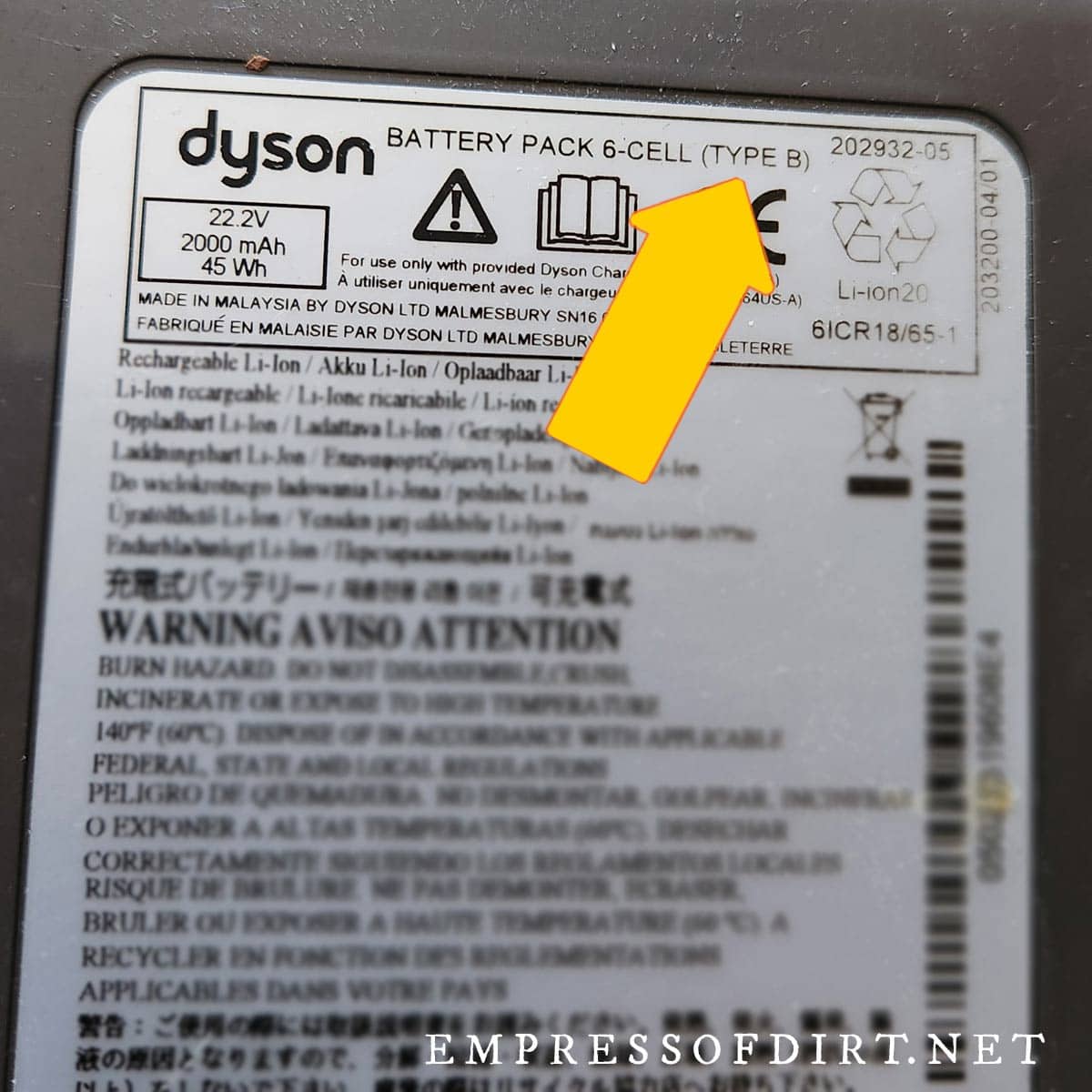
Look for the holographic security seal on the box lid. Real Dyson seals change appearance when tilted under light. Counterfeit stickers often remain static or peel off easily.
Missing seals entirely is an immediate sign of a non-genuine product.
Inspect the battery casing for molding imperfections. Authentic packs have smooth seams and consistent plastic texture. Fakes may show flash lines, rough edges, or mismatched colors.
The Dyson logo should be engraved cleanly, not painted on loosely.
Verify the serial number on the Dyson website. Every genuine battery has a unique code printed on the label. Enter this code into the official support portal to check validity.
Fake units often use duplicated numbers or invalid formats that fail verification.
Weight can also indicate authenticity due to cell density differences. Genuine lithium packs feel substantial and balanced in your hand. Counterfeits using inferior cells or empty space often feel lighter.
Compare the weight against specifications listed in your user manual if possible.
Smell the battery vents carefully when unboxing. New lithium cells have a faint metallic or neutral odor. Strong chemical smells or pungent plastic scents suggest cheap materials inside.
This sensory check can prevent installing a hazardous unit into your machine.
Buy only from authorized sources to minimize risk. Stick to the Dyson website, major established retailers, or certified repair centers. Avoid obscure marketplace sellers with no history or feedback.
Protecting your home from fire risks starts with verifying the source.
When a Replacement Makes Sense vs. Buying New
Deciding between a new battery and a new vacuum depends on several financial factors. You must weigh the age of your machine against the cost of revival. Sometimes pouring money into an old unit makes little economic sense.
Calculate the remaining lifespan of your current vacuum motor. Dyson motors typically last 5 to 7 years with proper maintenance. If your machine is already four years old, a new battery might only extend its life briefly.
In this case, upgrading to a newer model could be smarter.
Compare the battery cost to the price of a new unit. If a replacement battery costs 40% of a new vacuum, think twice. New machines come with full warranties, improved suction, and better filtration.
The extra investment often buys significant technological advancements and peace of mind.
Assess the condition of other components like filters and brushes. Worn-out rollers or clogged filters reduce efficiency regardless of battery health. If you need to replace multiple parts soon, the cumulative cost adds up quickly.
A fresh start with a new device might be more economical long-term.
Consider performance improvements in newer generations. Recent Dyson models offer longer runtimes, smarter sensors, and lighter designs. Sticking with an old V6 means missing out on these efficiency gains.
Upgrading provides immediate benefits beyond just restored power.
Environmental impact plays a role for eco-conscious consumers. Repairing extends product life and reduces electronic waste. If the vacuum body is still solid, replacing the battery is the greener choice.
This approach aligns with sustainable consumption practices advocated by standards bodies.
Check for recurring issues beyond the battery itself. Intermittent trigger failures or board errors signal deeper problems. A new battery won't fix electronic glitches in the main PCB.
Diagnose the root cause thoroughly before spending money on power restoration.
Use this simple decision matrix for clarity. If the vacuum is under 3 years old, replace the battery immediately. If it is over 5 years old and shows other wear, consider upgrading.
Machines between 3 and 5 years depend on your budget and satisfaction levels.
Those looking for keeping it running smoothly know maintenance has limits. Apply the same logic to your floor care tools. Know when repair transitions into throwing good money after bad.
Installation Basics and First-Charge Best Practices
Installing a new Dyson battery requires minimal tools but specific steps. You must follow the correct sequence to ensure safe operation. Proper initial handling sets the stage for optimal battery longevity.
Turn off your vacuum completely before starting any work. Remove the existing battery by pressing the release latch firmly. Slide or click the old pack out depending on your model series.
Inspect the connection ports for dust or debris before inserting the new one.
Align the new battery carefully with the guide rails in the handle. Push it in until you hear a distinct click or feel it lock. Tug gently to confirm it is seated securely and won't fall out.
Loose connections cause intermittent power loss and error codes.
Plug the vacuum into the charger immediately after installation. Lithium-ion batteries ship partially charged but benefit from a full initial cycle. Let it charge uninterrupted for at least 3.5 to 4 hours.
Do not use the vacuum during this first conditioning charge.
Monitor the LED indicator lights during the charging process. Solid green means fully charged, while flashing blue indicates active charging. Red flashes signal errors such as temperature extremes or connection faults.
Consult your manual if unusual patterns appear during this first session.
Avoid letting the battery drain completely on the first use. Try to recharge it once it drops to 20% capacity. Deep discharges stress new cells and can reduce overall cycle life.
Establishing good habits early maximizes the return on your investment.
Store spare batteries in a cool, dry place away from direct sunlight. Extreme heat or cold degrades lithium chemistry rapidly over time. Room temperature storage preserves capacity when the battery is not in use.
Never leave a charged battery sitting unused for months without checking it.
Rotate usage if you own multiple battery packs. Alternating between two units prevents one from aging faster than the other. This practice extends the collective lifespan of your power resources.
It ensures you always have a ready-to-go backup for large cleaning jobs.
Follow these steps to guarantee a smooth transition. Proper installation prevents physical damage to connectors. Correct charging habits protect the internal chemistry of the cells.
Your vacuum will perform reliably for years with this careful approach.
Safety First: Handling Lithium-Ion Risks and Disposal
Lithium-ion batteries contain hazardous materials that require careful handling. You must treat every pack as a potential fire risk if damaged. Puncturing the casing or exposing cells to water can trigger thermal runaway.
This chemical reaction generates intense heat and toxic fumes rapidly.
Never attempt to open the plastic housing of a battery pack yourself. Internal components remain under tension even when the unit appears dead. Short-circuiting the terminals with metal tools causes instant sparks.
Always keep coins, keys, and jewelry away from the contact points.
Store your spare batteries in non-conductive containers. A simple plastic bin or the original box works perfectly well. Avoid tossing loose packs into drawers full of metallic objects.
Friction during opening and closing can scrape off protective layers on terminals.
Watch for physical signs of failure before they become dangerous. Swelling or bulging of the plastic case indicates gas buildup inside. This "puffing" means the cells are failing and could rupture.
Stop using the battery immediately if you notice any distortion.
Unusual heat during charging is another major red flag. The pack should feel warm, never hot to the touch. If it becomes too uncomfortable to hold, unplug it at once.
Place it on a non-flammable surface like concrete or tile until it cools.
Disposal regulations strictly forbid throwing lithium batteries in regular trash. Landfill compactors can crush these units and start fires. Many municipalities report waste facility blazes caused by improper battery disposal.
You must take old packs to designated recycling centers.
Retailers often provide drop-off bins for used rechargeable batteries. Look for collection boxes at electronics stores or hardware chains. These programs ensure safe processing and material recovery.
Check local government websites for specific drop-off locations in your area.
Tape the terminals of old batteries before transport. A strip of electrical tape prevents accidental contact with other metals. This simple step reduces short-circuit risks during transit to the recycler.
It protects sanitation workers and sorting machinery from unexpected arcs.
Follow proper disposal protocols to keep your community safe. Environmental agencies mandate specific routes for hazardous electronic waste. Ignoring these rules puts everyone at risk of fire and contamination.
Responsible recycling closes the loop on valuable raw materials.
Pro Tips to Maximize Your New Battery's Lifespan
Extending the life of your Dyson battery starts with smart charging habits. You do not need to fully drain lithium-ion cells before recharging. In fact, deep discharges stress the chemistry and reduce total cycle count.
Plug it in whenever you finish a cleaning session.
Avoid leaving the vacuum on the charger indefinitely after it hits 100%. While modern BMS systems prevent overcharging, constant trickle currents generate heat. Unplug the unit once the light turns solid green.
This practice keeps internal temperatures stable and preserves cell integrity.
Clean the electrical contacts regularly to ensure efficient power transfer. Dust and hair can build up on the metal pins over time. Use a dry cloth or cotton swab to wipe them gently.
Poor connections force the system to work harder, wasting energy as heat.
Store your vacuum in a climate-controlled environment whenever possible. Extreme cold temporarily reduces capacity, while extreme heat accelerates degradation. Leaving the machine in a hot car during summer is particularly damaging.
Aim for room temperature storage between 50°F and 80°F.
Use the appropriate suction mode for your cleaning task. Running constantly in Boost mode drains the battery fastest and generates maximum heat. Stick to Eco or Auto modes for routine maintenance.
Reserve high power settings for stubborn messes or thick carpets.
Rotate between two batteries if you have a large home to clean. Alternating usage allows each pack to rest and cool down completely. This strategy prevents one unit from bearing the entire workload.
It effectively doubles the operational lifespan of your power supply.
Update your vacuum firmware through the official app if available. Manufacturers sometimes release optimizations for power management algorithms. These updates can improve efficiency and extend runtime without hardware changes.
Check the support section periodically for new software versions.
Keep filters clean to reduce motor strain. Clogged filters force the motor to draw more current from the battery. This extra load shortens runtime and increases heat generation.
Wash filters monthly according to the user manual instructions.
Those focused on routine upkeep know prevention beats repair. Applying these habits ensures your investment lasts for years. Small adjustments in daily use yield significant long-term benefits.
Your battery will maintain higher capacity for longer periods.
Common Questions About Dyson Battery Costs and Compatibility
Why does my new battery show a flashing red light?
A flashing red light usually indicates a fault with the battery or its connection. Check that the pack is seated firmly and the contacts are clean. If the issue persists, the unit might be defective or incompatible with your model.
Contact the seller for a replacement if it is brand new.
Can I use a higher capacity battery in my older Dyson?
Generally, no, because physical dimensions and firmware locks prevent cross-generation upgrades. A V11 battery will not fit a V8 handle due to different shapes. Even if it fits physically, the machine may not recognize the voltage profile.
Stick to the specific capacity rated for your model series.
How long should a genuine Dyson battery last on a single charge?
Runtime varies by model and power mode, ranging from 10 to 60 minutes. Eco mode typically delivers 40 to 60 minutes on newer V11 and V12 models. Boost mode drains even the largest packs in under 10 minutes.
Expect roughly 20 to 30 minutes of mixed-mode cleaning for most tasks.
Is it worth buying a refurbished battery instead of a new one?
Refurbished units can be worth it if they come with a solid warranty. Look for rebuilders who replace all cells and test the BMS thoroughly. Avoid cheap options that only swap out one or two bad cells.
A good refurb should perform nearly identically to a new pack.
What happens if I buy a fake Dyson battery?
Counterfeit batteries often fail quickly and lack safety protections against overheating. They may damage your vacuum's motor controller or cause a fire hazard. Warranty claims will be denied if Dyson detects non-genuine parts.
The risk far outweighs the small upfront savings from fake listings.
Do third-party batteries void my Dyson warranty?
Using non-OEM parts can void the remaining warranty on your vacuum cleaner. Dyson terms specify that unauthorized modifications or parts invalidate coverage. If a third-party battery causes damage, you pay for all repairs.
Keep receipts and stick to genuine parts if your machine is still under warranty.
Final Verdict: Which Battery Option Fits Your Budget and Needs
Choosing the right battery comes down to balancing cost, safety, and longevity. Genuine Dyson batteries remain the best choice for most users despite the higher price. They deliver consistent performance, rigorous safety standards, and reliable warranty support.
This option eliminates guesswork and protects your valuable cleaning tool.
Third-party batteries serve a niche for budget-conscious owners of older models. If your vacuum is out of warranty and sees light use, a reputable compatible pack works. Ensure the seller offers a decent return policy and safety certifications.
Avoid the absolute cheapest listings to minimize fire risks.
Refurbished batteries offer a compelling middle ground for eco-minded consumers. They restore old packs to near-new condition at a lower cost. Verify the rebuilder's reputation and warranty terms before committing.
This approach extends product life while saving money.
Match your purchase to your specific situation using this final guide. Daily cleaners and owners of new V15 or Outsize models should buy OEM. Occasional users with aging V6 or V7 units can explore quality aftermarket options.
Never compromise on safety certifications regardless of the path you choose.
Investing in a quality battery breathes new life into your vacuum. It restores the suction power and runtime you originally loved. Treat it well with proper charging and storage habits.
Your floors will thank you for the renewed cleaning performance.

Liam Parker covers robot vacuums, cordless vacuums, and smart home cleaning technology, focusing on practical comparisons, features, performance, and buying advice.
Related posts
 How Jen Does It: Cordless Vacuum Uncovered
If you have wondered how jen does it cordless vacuum, you are looking for a clear, visual walkthrough of her routine. She relies on a lightweight…
 5 Best Cordless Leaf Blower Vac 2026
Fall cleanup just got a whole lot easier if you ditch the cord and grab a best cordless leaf blower vac. These tools turn hours of…
 How Many Watts Is a Dyson Cordless Vacuum? Power Explained
Asking how many watts is a dyson cordless vacuum cleaner often leads to confusing answers because the number changes based on your settings. You might see…